
Accounts in different places
Daily checks mean moving between accounts, asset views and permission lists.
Manage Facebook ad assets, creative and leads, then review budgets, account health and performance in one connected workflow.
A connected toolkit. A clearer workflow.
Account checks, creative preparation and lead follow-up should fit together — with less time spent finding the right view.
Daily checks mean moving between accounts, asset views and permission lists.
Creative files, copy and publishing settings get assembled repeatedly.
Ad results, form submissions and group changes need to be reviewed together.
Teams need shared context on assets, access and the work already completed.
Choose the right service for the task. The public website explains the product; operational data belongs to the connected workspace or the selected tool.
Product information and usage guidance.
Manage assets, publishing, leads and reports, with operations tools for budgets, creative and account health.
Connect the active browser environment to workspace features.
27 utilities for files, text, links, 2FA and calculations.
Explore seven connected NadsX capabilities, from asset checks and publishing to daily performance analysis.
Bring Facebook ad accounts, Business Managers, Pages and Pixels into a clearer view for everyday checks.
Explore the product02Turn recurring Facebook ad publishing preparation into reusable templates, drafts and creative selections.
Explore the product03Keep collected references, your own images, videos and copy easier to find and reuse.
Explore the product04Connect Facebook form submissions, WhatsApp group changes and advertising costs in your operating review.
Explore the product05Review Facebook asset permissions, risk findings and report tasks, and consolidate account spend from media buyers and the administrator.
Explore the product06Connect NadsX to your browser environment and keep useful utilities close to daily work.
Explore the productIs spending on pace? Which creative deserves another look? Which accounts need attention first? Bring scattered signals together for more informed reviews, optimization decisions and team discussions.
Review each campaign cycle using period targets, spending pace and cost trends.
Compare assets, copy and existing experiments, then save a plan for your next refresh.
Use account health and alert checks to organize the issues that need human review.
Budget targets / Spending pace / CPA and ROAS
Creative performance / Meta experiments / Refresh plans
Account health / Alert checks / Account comparisons
Save targets, notes and plans to give the next review useful context.
Review budgets, creative, account health and performance using your selected ad data, then decide what to follow up next.
Track period targets, spending pace and conversion costs with complete-day trends.
Compare creative, review existing experiments and fatigue signals, then plan updates and copy.
Inspect account status, campaign scores and delivery dependencies for issues to review.
Review stage events and current totals, check thresholds and compare comparable accounts.
Operations tools are part of the signed-in workspace. Ad analysis requires NadsX; choose your account and scope, then start the analysis. Source and sample limitations remain visible.
Open operations workspaceTurn recurring Facebook ad publishing preparation into reusable templates, drafts and creative selections.
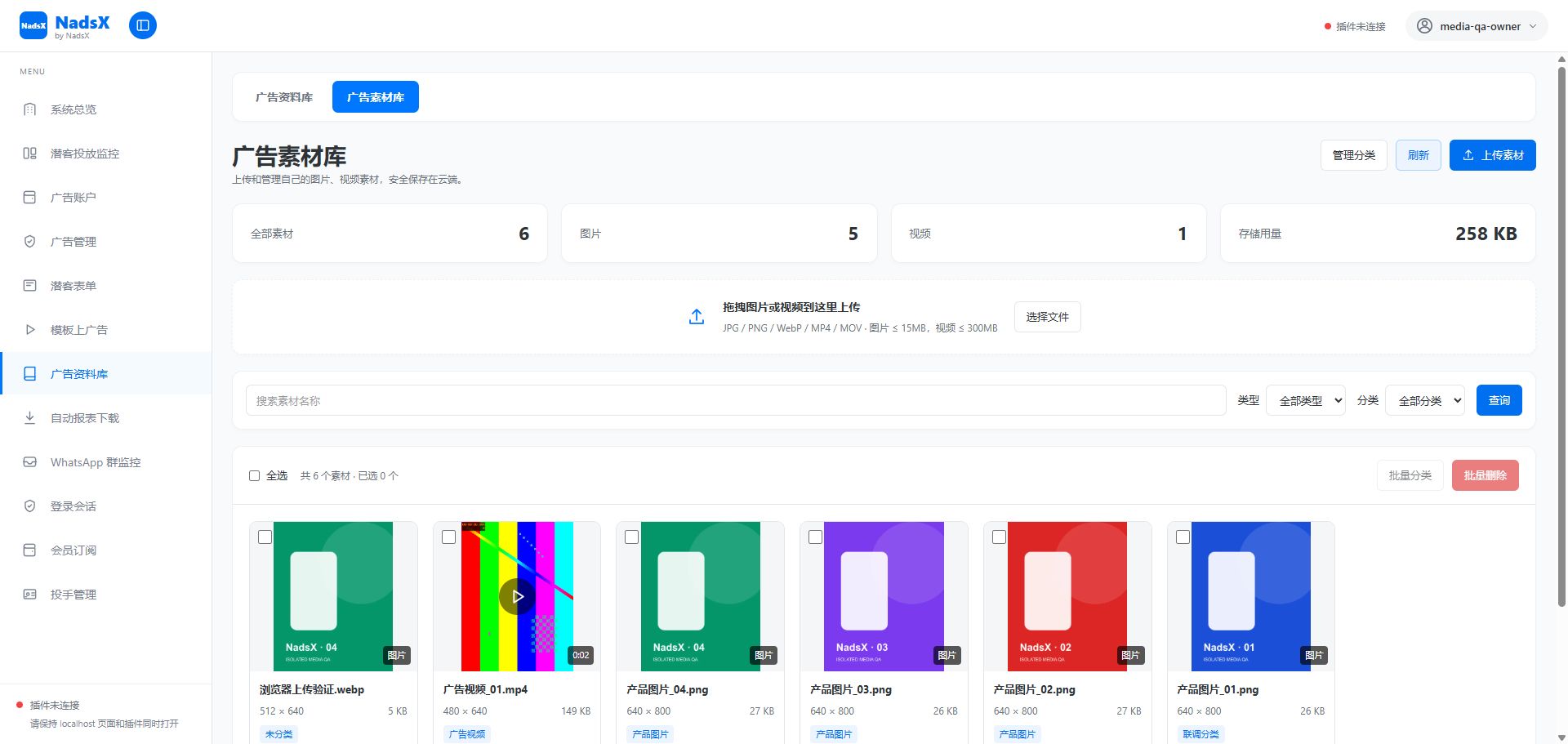
Keep collected references, your own images, videos and copy easier to find and reuse.
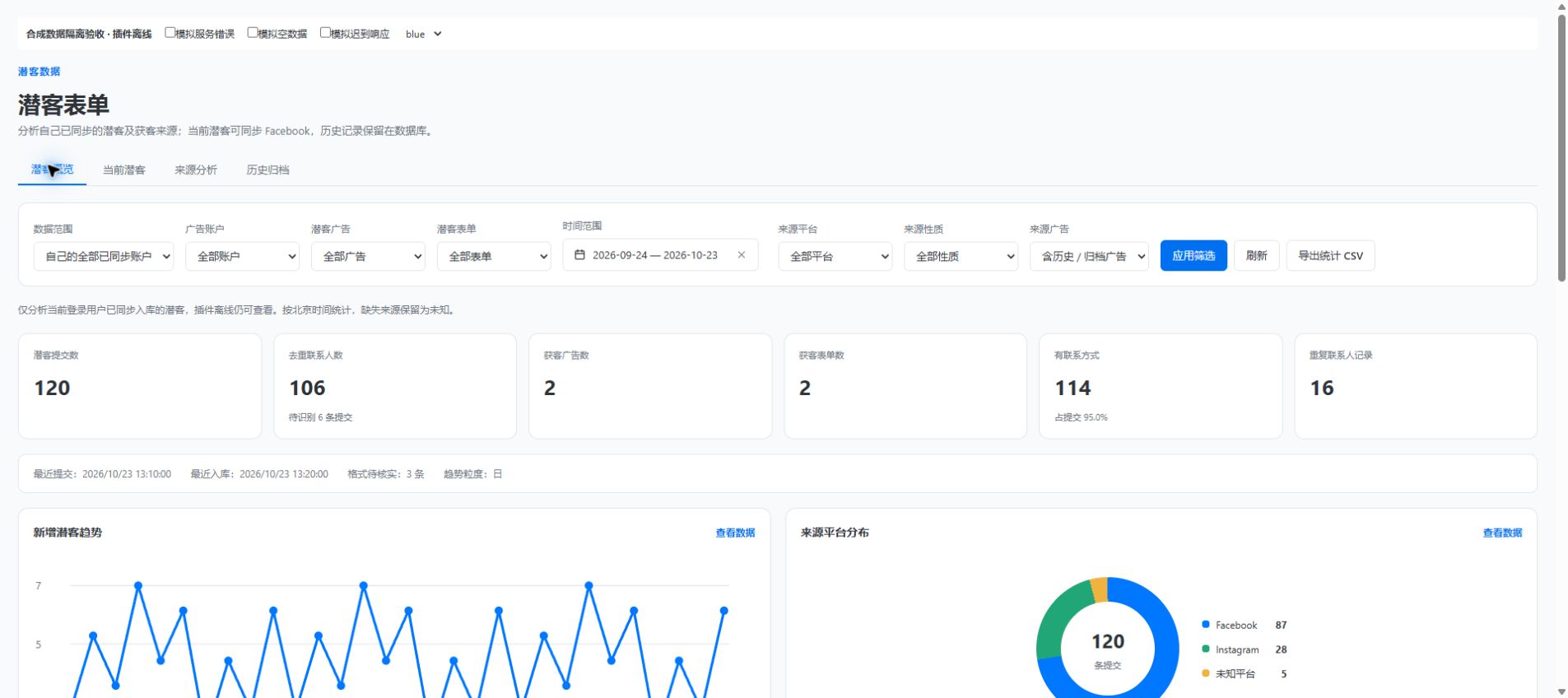
Connect Facebook form submissions, WhatsApp group changes and advertising costs in your operating review.
Create multiple media buyer accounts within your team's seat allowance. Members sign in with their own accounts and divide advertising operations across the team.
The main account creates media buyer accounts, resets passwords, and enables, disables or removes members as the team changes.
Each media buyer uses their own email and password, with email verification required on their first sign-in.
Available accounts follow your team's current entitlement. View total, used and remaining seats in media buyer management.
Facebook asset operations still depend on each member's actual permissions and browser extension connection.
Members manage their own ad accounts while the administrator reviews spend across the team. Bring account daily reports together to check costs and collection progress by responsible member and ad account.
Review reporting-enabled accounts from all media buyers and the administrator, with less chasing of individual spreadsheets.
Team totals deduplicate accounts managed by several members. Member summaries group each account under its assigned owner.
Total each original currency separately, use USD conversion as a reference, distinguish zero from missing data, and export CSV.
Enable collection, sync accessible accounts and save the sharing scope. The setting persists across page reloads.
The administrator selects accounts and dates. The relevant members’ online extensions run read-only collection tasks.
Check totals, trends, details and task status, then follow up on failures or missing data.
Collection requires the relevant member’s browser to be running, the extension online and a valid Facebook session. Saved reports remain available when collectors are offline.
Dates follow each ad account’s local calendar. Current-day values are snapshots taken at collection time, not a final bill.
Review accounts, prepare campaigns and follow operating results in one working routine.
Explore the productKeep creative assets, publishing templates and lead follow-up organized across daily work.
Explore the productCreate and manage multiple media buyer accounts from one main account. Members sign in independently and coordinate asset reviews and reporting.
Explore the product27 free utilities for account preparation, images, video, copy, links and calculations.
NadsX connects Facebook advertising asset management, publishing workflows, creative resources, reporting and lead operations through a workspace, browser extension and free utility site.
Features that read or operate Facebook assets use the connected browser extension and the permissions of your current Facebook identity. Free utilities and some stored workspace resources have separate requirements.
The free utility site is available without a workspace login. Workspace features follow the subscription, account access and team allowances shown after sign-in.
You configure and enable the supported rules. Execution depends on data completeness, connection state, cooldowns and applicable limits. Review the run records and results in the workspace.
English, Simplified Chinese, Vietnamese, Thai and Russian. The language selector preserves the current page when switching.
NadsX is an independent product. Facebook, WhatsApp and Meta names refer to their respective products and owners.
Operations tools belong to the signed-in workspace and use selected ad account data and saved operational settings. The separate free tools site offers image, link, calculation and other utilities, with its own access conditions.
Yes. The main account administrator can create multiple media buyer accounts within the team's seat allowance, manage their status, remove accounts and reset passwords. Each media buyer signs in with their own email and password and verifies their email on first sign-in. The actual allowance is shown in media buyer management.
Yes. Within members’ confirmed sharing scope, the administrator can review accounts from all media buyers and their own accounts. Team totals deduplicate ad accounts, member summaries follow the assigned owner, and currencies are totalled separately. USD conversion is a reference.
No. The setting is stored in the extension. Collection tasks are started manually by the administrator and require the relevant member’s browser to be running, their extension online and a valid Facebook session. Viewing saved cloud reports does not require an online extension.
Explore the workspace, connect the extension and start with the part of your workflow that needs attention.